
Building a Shopify product page with AI in 2026 means feeding a product URL into a tool like Mashup, picking one of a small set of category-tuned template kits, then refining the AI-generated copy, imagery, and conversion widgets in a visual editor before publishing the result as native Liquid sections directly into your theme — start to ship in about two minutes.
If you sell on Shopify, your product detail page (PDP) is the single highest-leverage page in your entire store. It's where intent meets price, where the bounce-rate cliff lives, and where a single hero image can swing your conversion rate by two whole points. It is also, almost always, the page merchants spend the least time on — because building one properly used to require a designer, a copywriter, a product photographer, and a developer.
In 2026, you don't need any of them. You need a workflow, a few good prompts, and about two minutes.
This is the field guide we use ourselves, and the workflow we built Mashup to automate end-to-end.
What a great Shopify product page actually contains
Before we talk about AI, let's be honest about what we're trying to ship. A PDP that converts isn't a single hero image and a "Buy Now" button — it's a sequence of small decisions, each one closing a different objection. The high-converting PDPs we've torn down in our own teardown library all hit five things:
- A hero that says what the product is in under three seconds. Not "Premium 2.0 Experience" — actually what it is. A photo that makes the use case obvious. A price visible without scrolling.
- Proof that other people bought it and were happy. Star rating up high. Review count. Two to three testimonials with real names and faces, not "John D., Verified Buyer".
- Specs and feature differentiation. What's actually in the box. What problem does this solve that the cheaper option doesn't. A comparison table if you have one.
- The objections section, addressed. Sizing, shipping time, returns, warranty, "is this for me?" — answered before the customer has to dig.
- A close. Urgency that's true, scarcity that's real, a bundle that makes the upsell genuinely attractive. No fake countdown timers.
If your PDP is missing any of these, you have headroom. AI is the cheapest way to add them.
Where AI helps — and where it doesn't
It is fashionable in 2026 to say "AI builds your store." The honest version is: AI is great at the first 80% of every section, and bad at the last 20%. It's a multiplier on a merchant who knows what they want, not a replacement for taste.
Concretely, here's the split we see in production:
AI is genuinely good at:
- Generating structured copy — hero headline, sub-headline, three benefit bullets — in your brand voice given a few examples.
- Drafting FAQs based on the product description, reviews, and competitor pages.
- Writing meta titles and meta descriptions that fit Google's character limits.
- Producing hero shots, lifestyle scenes, and angle photography from a single source image (this used to cost $400 per product).
- Picking palettes and section layouts that feel "designed" rather than templated.
AI is still bad at:
- Inventing facts about your product that you didn't supply. If it doesn't know your shipping policy, it will guess.
- Tone calibration without examples. Generic "premium" voice is the default failure mode.
- Anything where being legally precise matters (warranty language, ingredient lists, allergen disclosures).
- Knowing when a section is too much. AI will happily generate six testimonials when three would convert better.
The implication is: AI is a great first pass and a terrible final pass. You generate, you edit, you ship.
The actual workflow, step by step
Here's the workflow that takes ~2 minutes if you have a product URL, and ~10 minutes if you want to refine it for your brand.
Step 1 — Pick a template kit, not a blank canvas
Starting from a blank canvas is the most common mistake. AI generates better output when it has structural constraints. Picking a template kit (Mashup ships three: electronics, fashion/apparel, skincare & beauty) gives the model a section layout to fill in, rather than an empty page to invent.
If you build this manually outside Mashup, the equivalent is starting from a known-good Shopify theme section and editing it — not opening a blank Liquid file.
Step 2 — Paste a product URL, not a prompt
A prompt like "write me a product page for my wireless headphones" produces generic output every single time. The fix is to give the model the actual product — title, specs, reviews, FAQs, imagery — as structured input.
The easiest source is an existing product URL. Mashup scrapes Amazon, AliExpress, your existing Shopify product, or any other public product URL and extracts: title, bullet points, technical specs, customer reviews (with star ratings), images, and pricing. The model then has facts to work with instead of guessing.
If you're doing this without Mashup, you can do it manually: paste the structured product data into your AI tool of choice and ask it to generate copy from that data. The quality improvement over "write a product page about X" is dramatic.
Step 3 — Generate the whole page, then refine section by section
A common second mistake is trying to refine the page section-by-section during the first generation. Don't. Generate the entire page first. Look at the whole shape — does the section order make sense? Does the hero answer "what is this?" in under three seconds? Does the FAQ address the actual objections? — and then go back and regenerate specific blocks.
In Mashup this is Copy Studio: you click any block, change the tone preset or feed it a sample of your brand voice, and regenerate just that block while leaving the rest of the page intact. Outside Mashup, the equivalent is keeping your generated copy in a doc and rewriting one block at a time rather than starting over.
Step 4 — Swap the imagery before you publish
The single fastest way to make an AI-generated page look "AI-generated" is to keep the stock or model-generated hero image and ship it. Don't.
The fix:
- For physical products: generate three to five lifestyle shots with the product in context (on a desk, in a bag, on a person) rather than just the pack shot. Use those for the carousel.
- For digital/software products: screenshots beat illustrations every time. If you have a real interface, use it.
- For everything: the hero image should make the use case obvious, not just show the object. A pair of headphones is less compelling than a person wearing them on a commute.
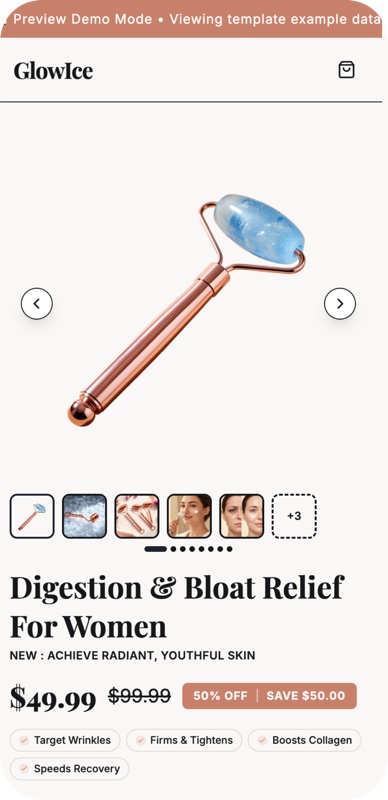
Step 5 — Add the conversion widgets that actually convert
The widget stack that consistently lifts conversion rate on PDPs is small:
- A countdown timer — but only if the urgency is real (a real sale end date, or a real shipping cutoff).
- A low-stock indicator — only if the stock count is genuinely low.
- A "live viewers" or "X people bought this in the last hour" widget — for products with steady volume, this is a strong social-proof nudge.
- An in-drawer upsell — when the customer hits "Add to cart", show a relevant bundle or complement before they go to checkout.
- A sale badge with a shipping promise — "Free shipping over $50" beats a 5%-off banner in almost every test we've seen.
The widgets that don't help: 14 different popups, exit-intent banners stacked on top of a chat widget stacked on top of a cookie consent, anything that prevents the customer from reading the page.
Step 6 — Ship it to your theme, not to a separate app
This is where most "AI page builder" tools fail and where you should be careful. A lot of tools generate a page that lives inside their app and gets injected via a <script> tag or an iframe. That's bad for: page speed, SEO, theme consistency, and your ability to leave the tool later without your store breaking.
The right approach is to convert the generated page into native Liquid sections and snippets that live inside your Shopify theme, the same way your existing sections do. You can edit them in the Shopify theme editor, customize them by hand, or delete them — exactly like sections you built yourself.
Mashup does this conversion in one click and runs a compatibility check against your active theme first. If you're building this workflow yourself, that step — going from generated output back to native Liquid — is the hardest part and worth dedicated developer time.
Common mistakes to avoid
Across hundreds of generated pages, the same six failures keep coming up:
- Generic hero copy. "Premium quality. Unmatched performance." means nothing. The hero should name the product and its specific benefit in concrete language.
- Six testimonials when three is plenty. AI loves to overshoot. Three real-feeling testimonials with names and faces convert better than six obviously-generated ones.
- No price above the fold. If a visitor has to scroll to find the price, you have a conversion-rate problem.
- FAQs that don't answer real objections. "What is your shipping policy?" is not an objection. "Will this fit my 11-year-old?" is. Mine your support inbox for the actual questions.
- Stock hero imagery. See Step 4 above — this is the #1 tell of an AI-generated page that hasn't been edited.
- Skipping the meta-title and meta-description. AI can generate solid SEO meta in seconds — there is no excuse for shipping a PDP with "Product Title — Store Name" as the title tag.
What a good PDP looks like in 2026
The benchmark we use internally: a brand-new merchant should be able to go from "I have a product URL" to "I have a shipped, on-brand, conversion-ready PDP live in my theme" in under fifteen minutes, including time spent on the refine pass. If your workflow takes longer than that, you have process debt, not creative debt — and AI is the right tool to clear it.
We built Mashup because that fifteen-minute pipeline shouldn't require five tools, three logins, and a developer. If you want to see what the workflow looks like end-to-end, install Mashup on the Shopify App Store — there's a 7-day free trial, and your first generated page lives natively in your theme either way.
Frequently asked questions
- How long does building a Shopify product page with AI take?
- Two to four minutes for the AI generation step, plus five to fifteen minutes of refinement (swapping a hero photo, tweaking the headline, choosing a palette). Compared to two to four weeks for a contractor-built page, the time advantage is roughly 200×.
- Do AI-built Shopify pages perform as well as hand-built ones?
- They can, provided you spend the refinement time. Pages generated and published without any editing typically convert 15–25% below comparable hand-built pages. Pages that are AI-generated and then human-refined for 15–20 minutes typically match or beat fully manual pages.
- Can the AI-generated page break my Shopify theme?
- No, if the tool compiles to native Liquid sections (rather than embedding a script tag or iframe). Mashup specifically ships sections that live alongside your theme's existing files — they cannot conflict with theme code and your theme update path stays clean.
- What happens if I don't like the generated copy?
- Every block on a Mashup page can be regenerated with one click, edited inline, or replaced with your own text. Copy regenerations are unlimited on every plan, so iterating is essentially free.
- Will Google penalize an AI-generated Shopify page?
- No. Google's stated position is that AI-generated content is fine when it's helpful, original, and not generated en masse to manipulate rankings. A Mashup PDP is page-specific, structured, and indexable — the same as any hand-built product page.


